
In the EAM Check tool, these provide access to Revit Energy Settings. Modifying these will update the settings in Revit.
These settings can improve issues where a project is only getting a partial energy model (where energy spaces and surfaces are not complete).
If the Project Phase is set incorrectly (some Revit elements may be on another Phase and these elements will then not be included in the energy model).
The Ground Plane is also an important setting in that if this is set incorrectly, elements on other levels may be excluded from the energy model. For example, if the Ground Plane is set to Level 5 and there are elements on lower levels, these elements will be excluded since the Ground Plane defines the levels from which the energy model will begin. All levels above this are typically included but those below this are not. This could be one reason why certain levels or spaces do not get energy spaces/surfaces.
There is dropdown list here (similar to the Energy Settings in Revit) where this setting can be adjusted.
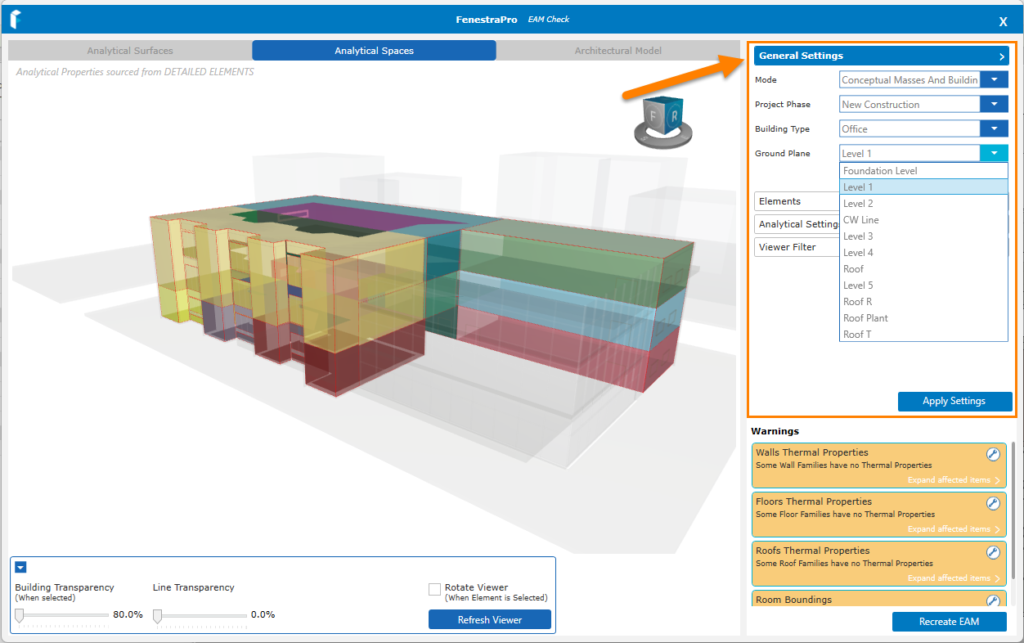
If any settings are modified, the Apply Settings button (1) should be used, then the Recreate EAM button (2) to update the model condition.

Note: If you have the Energy Settings window open in Revit at the same time, this can block any updates or creation of a new Energy Model. Please close any open Revit windows and complete any transactions there if you wish to use the application.


