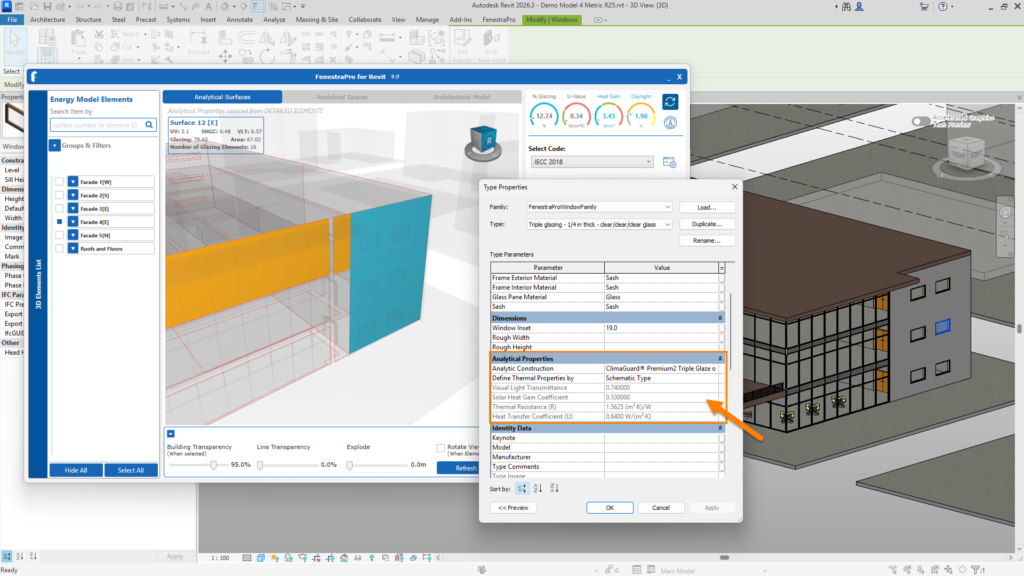
You may wish to confirm that the changes have been made in Revit also by selecting the glazed element in the Revit model and checking the Analytical Properties under Type Properties. These should have updated, subject to the correct conditions described in previous articles (that elements can be accessed to change the properties, that they have the correct settings, the elements are not locked or in linked files etc). There may be occasions where updates do not display in Revit. It is useful to periodically review in case there is an issue which needs to be resolved.
It will be necessary to restart Revit for new custom imported Glass Types to appear in Revit’s list. Then they may be assigned using the Glass Database in FenestraPro. Permission to edit the Constructions.xml file in Revit is also required. This is checked during the installation so this should not be an issue unless there are restrictions on your machine.
Once glass types have been added to Revit, they will be available for further use in this project and other projects without any restarting (as long as the Revit file is not modified (if entries are deleted), that permissions to access this file continue to be allowed and that the Revit file is not swapped out for another file without these entries or that does not have access permissions allowed).
Note: thermal properties and specifications of glass types in the database are hardcoded and will not be modified by changes to the thickness of the element in Revit’s Type Properties. The assembly of the glass type is often given in the description. Thicknesses for solid elements (Floors/Roofs/Walls) however will affect the U-value/R-value as they are dynamic in Revit. Thicknesses of layers for solid elements as well as materials and thermal conductivity values will affect their thermal values.