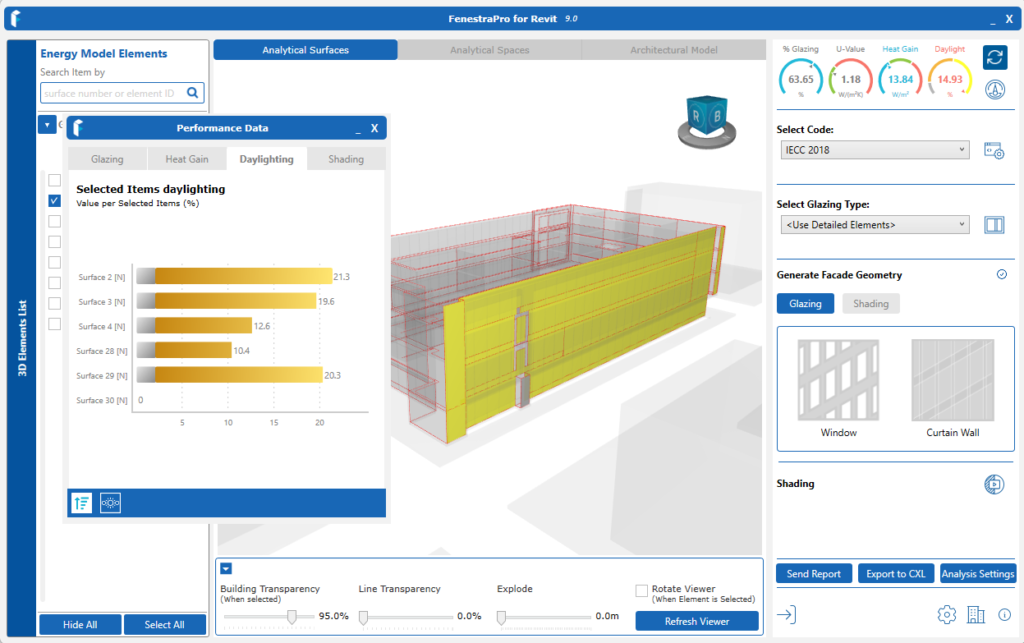
This Chart displays Design Daylight Factor per Unit Floor Area within the Perimeter Zone for the selected Façade(s)/Surface(s). Clicking on a specific Surface will only display results for that alone. The results are graded by color to provide a visual indication of low daylight (gray) to good daylight (yellow).
Note:
- The Daylighting Charts will factor in the effect of shading objects (even if ‘Calculate Shading’ is not turned on in Analysis Settings or on the launch window when you start). Therefore you may not see any change in the Daylighting results when Shading is turned on/off.
- Vertical Fins on the model will currently not affect the Daylighting results (due to the current calculation method used).
Selections
- You may make selections using the Facade Navigator which displays a list of Facades and Surfaces (vertical bar on the left , labelled 3D Elements List).
- You may also select area by hovering over areas on the model in the main Viewer. You may make a single or multiple selections using the model.
- You may also make selections using the Charts (a single Facade (all Surfaces within this) or a single Surface). It is not possible to select multiple random Surfaces using the Charts (this may be done using the model in the Viewer or from the Facades List).
Areas will highlight on the model in the Viewer when selections are made. The Charts will display results for each selection made. The Dashboard will display an average for all selections made. The Roll Up button is provided below the Charts to deselect any Surfaces and return to all Facades.
Note: The average/peak button is disabled for Daylighting Charts and does not apply (this only available for Heat Gain Charts).