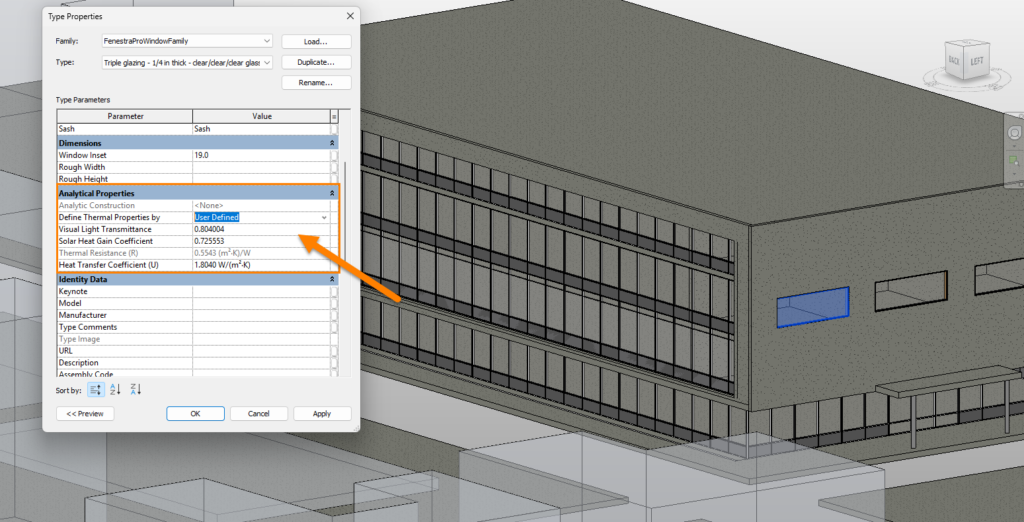
Analytical properties for walls, roofs and floors are taken from the Revit elements (if the assemblies have been defined using materials, thicknesses etc). Glazing types may also be defined in Revit using Type Properties.
These Revit properties are read by the application. A Glass Database of Guardian, Vitro and Viracon sample products is also included and glass types may be selected here and applied to Revit elements.
The FenestraPro Glass Database must first be synced with Revit so that these entries are also applied to the Revit model. This syncing will happen automatically after you first use the application (this will require a manual one-time restart of Revit). You can also resync the database anytime if custom glasses are imported using FenestraPro and then need to be added to Revit.

User Defined properties may also be used in Revit for glass types (as custom defined values for SHGC/VLT and U-value/R-value). FenestraPro will read these values and use them to calculate the Facade Performance and display the current values in the Model Viewer.
Note: when changing glass types, this function will not operate if the element has the ‘User Defined‘ setting in Revit (this would first need to be changed to ‘Schematic Type‘ under Type Properties to access the glass construction types list).