
The Surface area is displayed in the Facades list on the left-hand side when this list is expanded. The percentage glazing is also displayed along with the size of the Surface.

These areas are based on Revit’s Energy Model analytical Surfaces are may be slightly different to the actual element Surfaces in the model depending on various factors such as jointing conditions, resolutions, perimeter zone depth an divison settings. Adjustng the Analytical Resolutions in the Energy Settings of Revit or in FenestraPro’s EAM Check tool, may affect these areas and consequently the glazed percentages. Please refer to the Energy Model Issues section on this support site here.
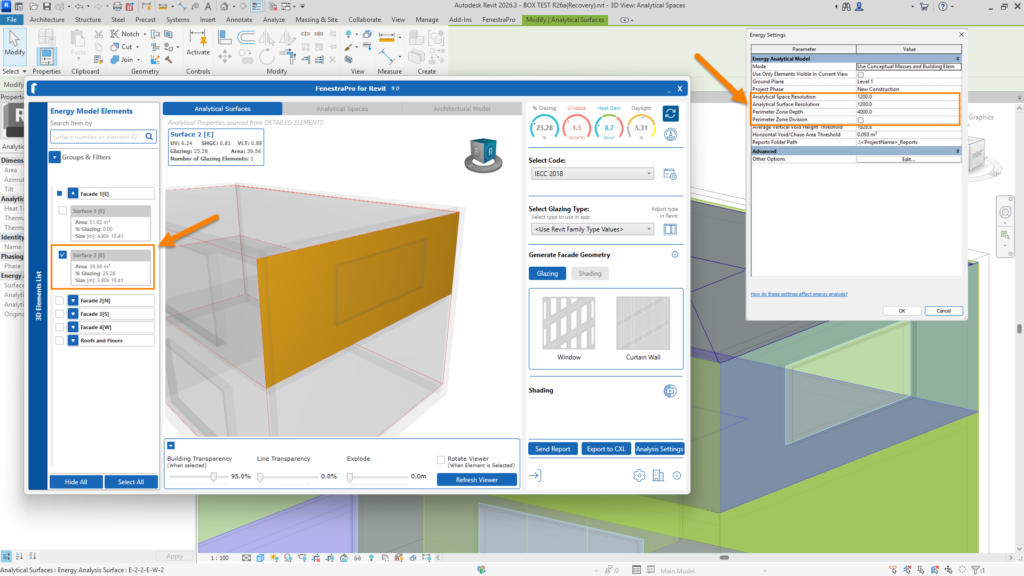
Adjusting settings here may affect the areas and conseqently the glazed percentages. Please refer to the Model Preparation and Energy Model Issues articles for guidance. Typically, low Analytical Resolutions, a reasonable Perimeter Zone Depth (6 metres / 15-20 feet) and turning off Perimeter Division are recommended to get complete surface areas.


